docMonster logodocMonsterFree Download

Tame Your Document Chaos

AI-powered scanning and filing directly to your client folders. Press Ctrl+Space, type a client name, hit scan. docMonster names the document, files it in the right folder, and gets out of your way.

Free Download for Windows
Windows 10/11100% LocalNo Subscription
AI

AI Naming

Automatically rename and organize documents using intelligent AI, with a human confirming every name.

Local

100% Local Privacy

Your documents never leave your device. OCR and AI can run entirely on your own machine.

PDF

Scan to PDF

High-quality scans converted to PDF, timestamped, and filed straight into your client folders.

Built for the people who scan for a living

Law firms, CPAs, financial advisors, title companies, and anyone drowning in paper.

Your documents never leave your PC (unless you say so)
AI naming that works fully offline
Actually free. No trial, no tiers, no catch

"Scan_0001.pdf" is where documents go to die.

You scanned it three weeks ago. It is somewhere. Named something like img20260614_0932.pdf, in a folder called New folder (2).

Every misfiled scan is a future emergency. docMonster fixes the moment it goes wrong: the moment paper becomes a file.

Instant search

A launcher that keeps up with you

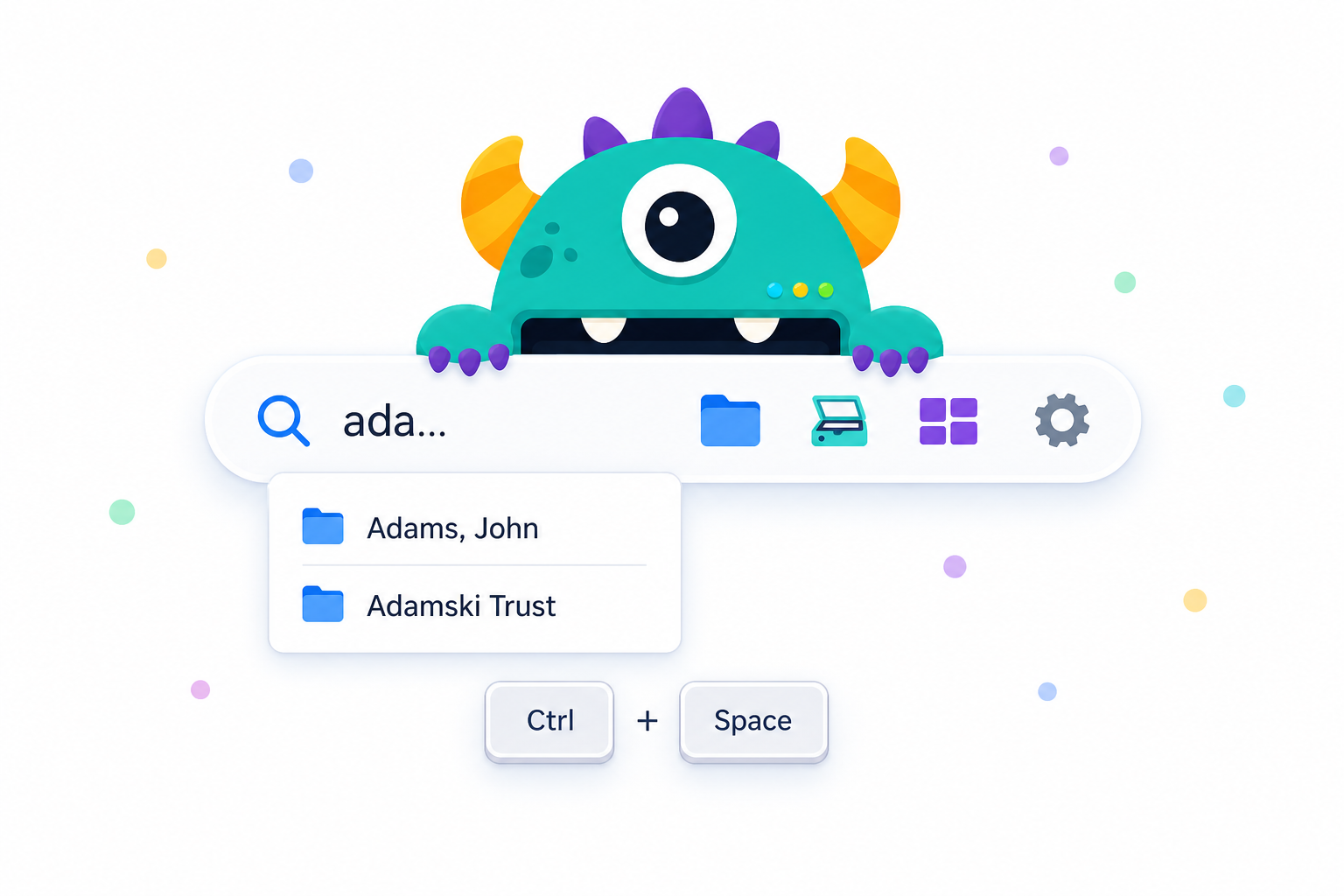
Press Ctrl+Space anywhere in Windows. Type three letters of a client name. Their folder, their CRM record, and a scanner window are each one keystroke away. docMonster indexes your client folders so search is instant, even on a big network share.

The docMonster launcher pill with instant client folder suggestions
The monster reading a scanned document and suggesting the name Utility Bill 06.15.26
AI naming

AI naming with a human in the loop

Scan a document and docMonster reads it, names it, picks a filing category, and drops it in the right subfolder. You confirm every name before it is filed. Bring your own key for OpenAI, Anthropic, or Grok, or use the built-in offline model and skip the cloud entirely.

Batch scanning

Feed it the whole stack

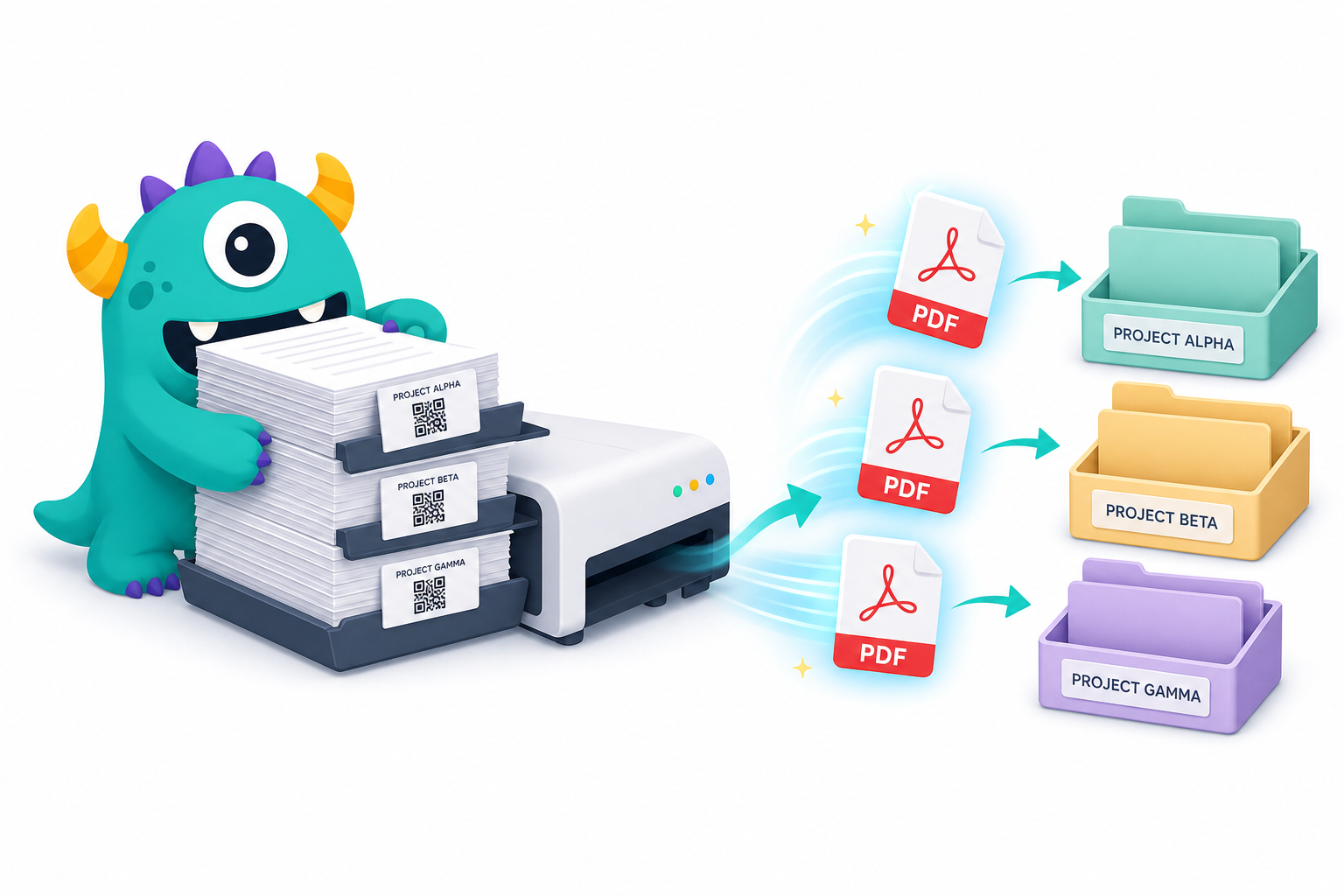
Print QR separator sheets once, slip one between each document, and scan the entire pile in a single pass. docMonster splits the batch at every separator and names each document. Twenty documents, one trip to the scanner.

A stack of documents with QR separator sheets becoming named PDFs in client folders

And it fits the way your practice already works

Privacy you can actually verify

Page images are never sent to any AI, only OCR text from the first few pages. OCR runs locally by default. Choose the local AI model and nothing, not one byte of your documents, leaves your computer. No account. No telemetry server. No docMonster cloud.

Scanner optional

Got a TWAIN scanner? Great. Don't? Import PDFs, photos, TIFFs, or Word/Excel/PowerPoint files and docMonster treats them exactly like a scan. Same naming, same filing, same one-click workflow.

Your rules, not ours

Autocomplete lists, filing subfolders, AI naming categories, date formats, all editable in plain English. Ships with templates tuned for estate and trust work; reshape it for any practice in minutes. Run multiple domains and share them with colleagues as a single export file.

Compliance-conscious by design

A built-in AI Compliance Assessment generates a report on your exact configuration, covering attorney-client privilege, IRS Pub 4557, and HIPAA considerations, so you can show your compliance officer precisely what does and does not leave the building.

How it works

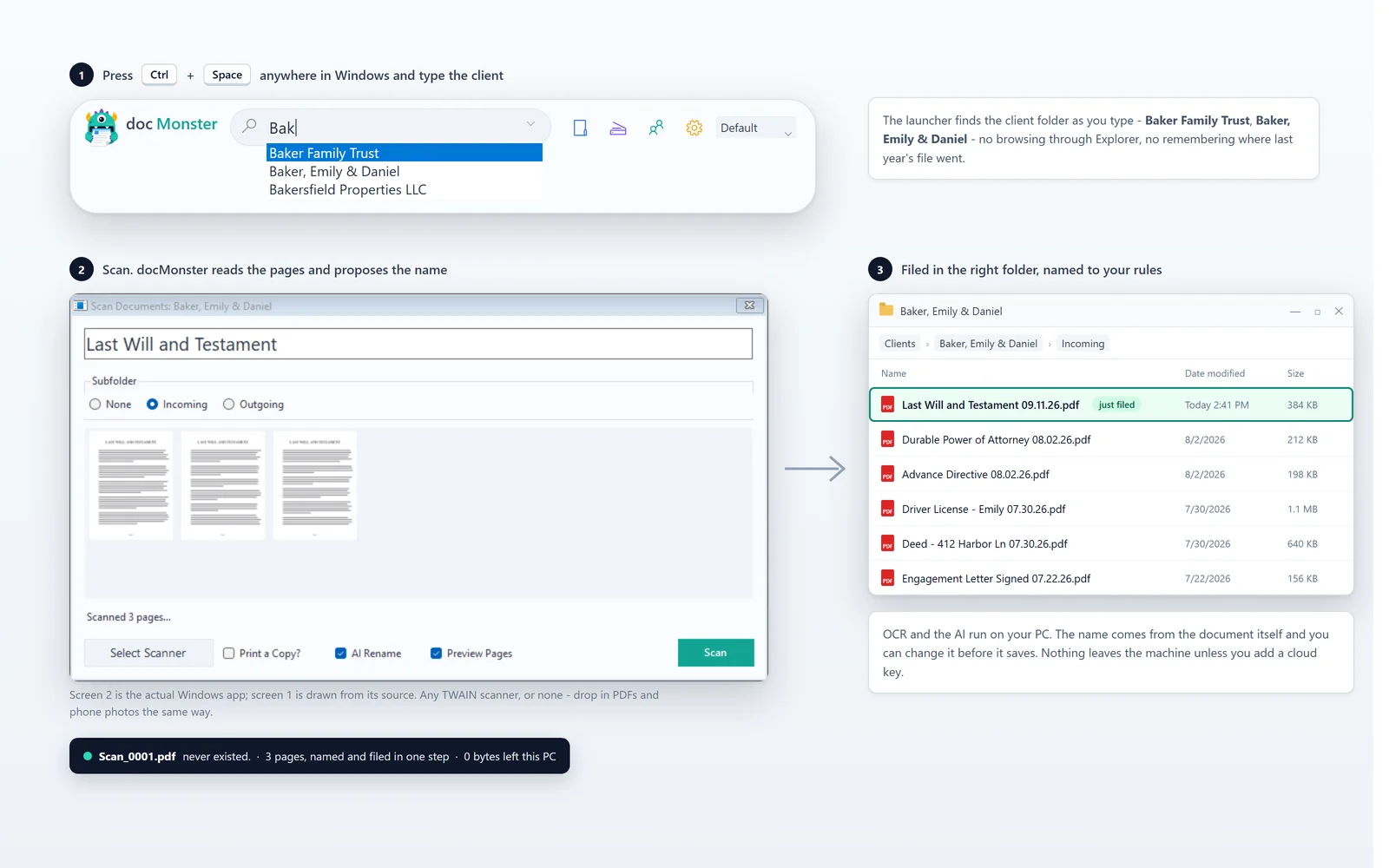
1

Summon

Press Ctrl+Space and type a client name.

2

Scan

Hit Enter, load the feeder (or import a file), click Scan.

3

Confirm

AI suggests a name and category; you click Ok.

That's it. The PDF lands in the client's Scanned Documents subfolder with a timestamp, a clean name, and a category, and Explorer opens to show you it's there.

The monster safe inside a vault with no internet connection

The AI that never phones home

Most AI-powered tools are a data pipeline to someone else's server. docMonster gives you a real alternative: a one-time ~2.5 GB download puts a capable language model on your own machine. After that, AI naming works on a plane, in a basement, behind the strictest firewall, and your clients' documents are never anyone else's training data.

Local OCR + local model = zero bytes leave your PC

Free. As in actually free.

No trial clock. No feature gates. No credit card. Enter your email and your download links will appear right here.

Two installers: 32-bit works with most scanners, 64-bit is for scanners with 64-bit TWAIN drivers. Not sure? Pick 32-bit.

Requires Windows 10/11 with .NET Framework 4.8. Installs per-user, no admin rights needed. Digitally signed.
Frequently asked questions

Is it really free?

Yes. Download it, use it in your firm, put it on every machine. If you use a cloud AI provider (OpenAI, Anthropic, Grok, or AWS Textract), you pay them for API usage, or use the built-in local model and pay no one.

Do I need a scanner?

No. docMonster imports PDFs, images, and Office documents through the same workflow. If you do have a scanner, anything TWAIN-compatible works.

Do I need an AI subscription?

No. AI naming is optional, and the offline local model needs no key, no account, and no internet after a one-time download. You can also skip AI entirely and use autocomplete names and QR codes.

Where do my documents go?

Into your own folders, as PDFs. docMonster has no cloud, no server, and no account system.

Will it work with my folder structure?

If your world is one folder per client, yes. Point docMonster at the parent folder and you're done. Nested one level deeper (alphabetical bins)? There's a checkbox for that.

We're a law firm / CPA firm. Can we defend using this?

docMonster was built for exactly that question. Images never go to AI models, OCR can run fully locally, the AI can run fully locally, keys are DPAPI-encrypted, and the built-in Compliance Assessment produces a configuration report you can hand to counsel.

What's the catch?

There isn't one. docMonster is free software from Breichbilt.

Your scanner is fast. Your filing should be too.

Download docMonster Free

Windows 10/11 · Free forever · Set up in two minutes